Coleman Technologies Blog

Coleman Technologies Blog

We can give your organization comprehensive IT services and 24/7/365 live support for a predictable monthly fee. Stop stressing about technology, and start focusing on growing your business.

Tip of the Week: How to Keep Your POS from Being a PITA


The first considerations you need to make are fairly straightforward.

Cost

You really do get what you pay for. Rather than settling for a cheaper system with plans of replacing it later, make sure you select a system that can be upgraded and expanded (yes, there is a difference). That way, you can avoid doubling your costs by eliminating the need to procure more than one system. It also helps to seek out a vendor that can supply all the needs your business has - like additional hardware for your POS, or enhanced software to power it - to simplify your processes.

Integration and Implementation

As mentioned before, your POS system should have the ability to grow as your needs of it do. For instance, while you may want to implement customer pagers at some point, it is probably wiser to focus on the essentials - like receipt printers and cash drawers. However, you will also want to make sure that your POS system has the capability to be upgraded to incorporate more advanced features as your business grows.

Tracking

Although this isn’t too far off from integration, you may want your POS to integrate with your inventory system, your quoting system, your CRM software, or any other business app on your network. Depending on your needs, you might even want your security cameras to pull a feed from your POS system to record purchases.

Support

Let’s face facts… you don’t want to find your POS system experiencing technical difficulties without anyone available to help you resolve them. Whether its complications with the software itself or a hardware issue, you need to be sure that support is always available to you.

When running a business, it is crucial that you have the technology to properly take payments. Coleman Technologies can help ensure that you are prepared to do business with reliable solutions. Give us a call at (604) 513-9428 to get started.

Continue reading

Tip of the Week: Minding Your Manners in the Office Again


Mobile Device Use

When working from home, the reasonable threshold for mobile device use is significantly different. Theoretically, you could talk to someone on speakerphone with the phone across the room (although you shouldn’t). However, there are other people with you in the office that you could potentially distract.

Take a moment and remind your team of this. Instead of holding long conversations at their desk, make sure they try to keep their calls brief and that they do whatever they can to avoid disturbing others—including leaving the area, if necessary.

Instant Messaging Use

Again, we have the kind of situation where the standards in the office are much different than those for a remote worker. When working remotely, your team needs to be able to communicate and should do so in both a professional and social manner. This is not so much the case in the office.

Allow me to clarify. When a team is working remotely, some socialization via instant messaging can be considered appropriate, so long as it is not interfering with the workday’s processes. This is simply because they are working remotely and can’t socialize with one another face-to-face. In the office, your team can—and almost certainly will—socialize throughout the day amongst themselves. Again, if done in moderation this encourages cooperation, but it can become a hindrance to your productivity if it goes too far. There is also the risk that if your messaging solution is used too much as a stand-up special your team will be less likely to read the important messages that are shared.

Moderation is key, so make sure your team is aware of that as they come back in.

Proper Communications

With so many working from home, remote conferencing solutions have seen a lot of use in recent months. While it may have been out of necessity at first, many users have begun to see the value of the integrated webcam on their laptop when it comes to holding a virtual meeting.

Of course, if these technologies are so helpful to us now, why should that change once people are back in the office? Communications with prospects and clients alike can be improved through a good conferencing solution. Continuing to embrace their options will only help to make the business and its processes more agile.

Whenever it is that people finally get back to the office for the long term, there’s a good chance that some bad habits may have developed by that time. Make sure that you address your expectations in a comprehensive written company policy. Reviewing these policies with your team, along with your privacy and security standards, will help smooth out the transition process and make your expectations clear.

If you’ve already transitioned back, tell us, how has it gone? Are there any challenges that you didn’t expect? Share them in the comments and reach out to Coleman Technologies for any technical assistance needed. Give us a call at (604) 513-9428 to learn how we can help your team remain productive, wherever they’re working.

Continue reading

Tip of the Week: 5 Ways to Maximize Productivity, According to Experts


Two-Hour Solution

Roger Seip, author of Train Your Brain for Success, took a proactive and prepared look at productivity by developing his Two-Hour Solution. The idea is to take two hours to plan out a schedule to follow each week, based on how your plans and goals culminated the week before. Investing this time should allow you to make the most of your available time to accomplish what you want to accomplish.

The reason that this is different than simply going over your calendar each week is the fact that, if guided by the Two-Hour Solution, you’re figuring out how the time you’re spending contributes to your goals. “Green time” is time that helps you generate financial capital, while your “red time” is the time that you spend preparing for green time, without generating any profit. To account for the wrench in the works that would ordinarily throw off your schedule, you also include “flex time” to provide a buffer. What’s left is your “re-creation” time, where you recover from your productive endeavors by doing the things you want to do.

Prioritizing

Steven Covey is an educator and a businessman who came up with a philosophy to living a full life that can also apply to life in the office.

Consider your big priorities, your more flexible responsibilities, and your rote tasks in the workplace as large rocks, smaller stones, and sand, respectively. Your time is a bucket, ready to be filled with these items as you see fit.

Let’s say you decide to start with the “sand,” before trying to cram in the “rocks” and “stones.” Chances are pretty good that you won’t be able to accomplish very much at all, at least nothing of any circumstance. However, if you prioritize the more impactful rocks, then the stones, and fill in the rest of the space with your sand, your bucket—or workday—is then used as productively as possible, and anything you didn’t get to complete isn’t of consequence.

Two-Minute Rule

While there are countless variables that can potentially influence the amount of time a task will take to complete, you eventually get a feeling for the typical duration, right? So, some tasks can predictably take a significant amount of time, while others take almost no time at all to make it through. The idea of the Two-Minute Rule, thought up by productivity consultant David Allen, takes advantage of that difference. His strategy: if a task will take two minutes or less, do it.

If that seems too simple, it kind of is. The philosophy behind the Two-Minute Rule is to build up your motivation to tackle the larger responsibilities by successfully completing smaller tasks. Think about it—every task, regardless of how large it is, can be broken into smaller, more manageable chunks, chunks that can take mere minutes to complete. Once you’ve completed enough of these two-minute tasks, it only makes sense to see the greater responsibility through… and with the progress you’ve already made supporting you, completing it seems that much more feasable. 

The Blastoff Method

Entrepreneur and motivational speaker Mel Robbins devised this practice to help overcome the mental blocks that encourage us to procrastinate rather than doing things that are good for us. Robbins posits that, by hesitating, we put the brain into “protection” mode—by thinking about everything that needs to be done between point A and point B, your brain ultimately prevents you from doing what you need to do. However, if that hesitation can be avoided, your productivity (or, by Robbins’ original theory, your well-being) will see benefits.

Her solution is to close the gap that hesitation creates between your capability to do a task and your perception of that task. Her recommendation is to, quite literally, treat yourself like a rocket and count down to your action. Focus on counting down…5,4,3,2,1… and act immediately, before your thoughts get in the way.

Scientifically, by doing so, you are bypassing a behavioral process and resetting an established habit loop… allowing better, more productive habits to be created instead. Give it a try next time you encounter a task you want to avoid starting.

Create a Time Crunch

We’ll wrap up with another method that Roger Seip came up with. If you really feel you work better on a deadline, add a bit of a hurdle as you are scheduling your “green time” … give yourself less time than you think you’ll need. The pressure can help you to focus. Naturally, you need to avoid any flex time you have assigned for this to work.

What methods do you use to keep yourself focused and productive? Do any of these approaches sound like something you want to try? Let us know in the comments!

For the technology solutions that can also help you improve your practical productivity, talk to us! Give us a call at (604) 513-9428 to discuss your options.


Continue reading

Tip of the Week: How to Make Use of Otherwise Wasted Time


Tip of the Week: How to Make Use of Otherwise Wasted Time

As much as we try to structure our productivity throughout the day, there are always those moments that seem to slip by—both at work and in our personal lives. It can be tough to find time to commit to projects whether your goal is personal or professional.

So, let’s go over some tips that help make this time easier to find. 

The Truth is, the Time is There… You Just Need to Be Ready for It

Most people underestimate the amount of time they actually have available to them—although, to be fair, this time is often hiding in plain sight. Do you find yourself sitting through a long bus trip to get to work, or relegated to the back seat in an uncomfortably silent carpool arrangement? When working from home, how much time do you spend in the morning waiting for your coffee maker of choice to produce your preferred cup (or pot, no judgment from me) of joe? 

The fact of the matter is that in these little moments we chalk up to time wasted, there’s the opportunity for productivity. Small as these moments may seem, nobody said that productive work has to be of a certain duration. By taking advantage of the spare moments before a meeting starts, or when your usual breakfast is cooking, or any other time that would otherwise be lost to the ether, you can accomplish that much more.

How often do you find yourself having some of your best ideas during these moments?

You Just Need to Be Ready for When These Moments Arise

By having the right tools and strategies prepared, you’ll be in a good position to take advantage of every spare moment. Chances are good that you regularly have access to a mobile device with some form of a note-taking app. Get in the habit of quickly typing up your ideas.

If you’d rather rely on a low-tech option, make sure you’re always carrying a pen with you. Everything from a receipt to a napkin can be used to quickly store a thought until you have the opportunity to more permanently record it.

Furthermore, it is important that you manage your expectations. It’s very unlikely that your quick notes will be an earth-shaking idea. Much more likely, it’ll just be the first draft of many ideas that eventually become a real strategy or initiative.

While We Can’t Give You the Inspiration You Need, We Can Give You the Tools You’ll Need to Act Upon It

Reach out to us to learn more about our IT services and support options, and how we can help you and your team accomplish more. Give us a call at (604) 513-9428 to get started.

Continue reading

Tip of the Week: Setting Your Out-of-Office Message in Outlook


Tip of the Week: Setting Your Out-of-Office Message in Outlook

The holidays are fast approaching and that means people are going to miss work for one reason or another. If you can get away from the office for a little bit, you’ll want to set up an out-of-office message to ensure that others know you will get back to them when you get back to the office. Here’s how you can set up an autoresponder for an out-of-office message in Microsoft Outlook.

How to Set Up Your Out-of-Office Message

Setting up an autoresponder in Outlook is simple. To get started, open up Outlook and select File.

Under the Info section—the one with the Home icon—make sure you have your account selected. You should see an option underneath it for Automatic Replies.

In the box that appears, you will see an option for Send Automatic Replies. You can configure your auto replies to send only during a specific timeframe using the drop-down boxes and date ranges. Once you have the dates determined, you can use the textbox beneath to enter your auto reply message. This will be sent to anyone who sends you an email while you have your autoreply active.

It’s also worth noting that you have a lot of control over the text that appears in this box. You can include links to resources, contact information for who they might want to contact while you are out of the office, and so on. We recommend that you don’t just leave your contacts with a simple “I’ll get back to you.” If you do leave the office for an extended period of time, be sure to give your contacts some direction, as it could make all the difference for a prospective client, annoyed customer, or other disgruntled auto reply recipient.

We hope you found this tip helpful! If you have any suggestions for future tip blogs, be sure to sound off in the comments below.

Continue reading

Tip of the Week: Cloud Decisions for the SMB


Countless Options

The cloud provides a myriad of options for any-sized business. In the cloud, you can host applications, communications, storage, and even full-platform infrastructure. With so many options available, your business can get the computing power and tools it needs, when needed. 

User Tip: When trying to determine which cloud platforms are right for you, you may find the cost/benefit analysis won’t give you the definitive answer you are looking for. Your best bet is to prioritize which information systems would work best hosted onsite and which one brings the most value hosted in the cloud. The best decision for your business’ bottom line may not be the best decision. 

Productivity Improves

One of the most important aspects of cloud computing is the possibility that it provides a modern business. With all of the options the cloud presents, a business can pick and choose how to leverage them to produce increased productivity. Of course, the computing platform itself isn’t going to produce more, but with the data and application accessibility and the collaborative options the cloud provides a business, they are able to get more done, faster.

User Tip: Cloud computing may provide the ability for your team to collaborate better, but it isn’t going to produce anything on its own. One tip to ensure for efficient collaboration and enhanced teamwork using cloud interfaces is to assign one person to manage the files and data inside your cloud solution so that everyone knows who to go to if they need answers. Running a project is a lot like running a basketball team, one person has to run point.

Monetary Benefits

Implementing cloud computing can absolutely help save a business money off the bat. A shift to the cloud works to eliminate huge capital costs. Say you need a server. If you bought, powered, and supported the hardware yourself, you are looking at a bill that’s likely in the five-to-six-figure range. If you choose a cloud, you can fire up a new server for a monthly fee that gives you a lot of the same computing power your business commands, without the waste of computing resources and the upfront expense you would see by running your own hardware.

User Tip: The cloud may help you transfer cost, but if you jump in with both feet it can get pricey quick. That’s why it is important to migrate your processes, data, and infrastructure to the cloud in small, incremental steps. It keeps operational costs down and keeps your IT administrator sane. 

At Coleman Technologies, we understand the value of cloud computing, but we also recognize that the cloud isn’t right for every situation. If you would like to meet with our knowledgeable consultants about a shift to the cloud, call us at (604) 513-9428 today.

Continue reading

Tip of the Week: How to Restore Your Android Apps and Settings


Even if you aren’t planning on replacing your phone soon, it may make sense to pay attention here, as this process will also make it easier to restore your data to a new phone if needed. Either way, this process is much easier if you make some proactive preparations on your current phone.

Enabling the Native Android Backup Capabilities 

The first step is to make sure that your current phone has the backup service running. It can be found in your Settings, under System. Tap the Backup option, and check to see that the option to Back up to Google Drive is selected. If it isn’t, do so.

Now you have a copy of your current phone’s configuration to restore from, which you can do from the initial configuration of your new device. If you were using the Google Now or Pixel Launcher, even your backgrounds, icons, and folder structure is saved.

During setup, hit the Let’s Go button that appears at the welcome screen. Tap Copy your data, and connect to Wi-Fi.

Now, you’ll be presented with your restoration options. Since we just went over how to save a backup in the cloud, let go with the option to use A backup from the cloud. You’ll be prompted to sign into your Google account, and to agree to Google’s Terms of Service.

From the list of backup options, select the correct one. You can easily hit Restore to recover all of your previous device’s settings and data, and can select which apps to reinstall via Apps.

As your data is pulled over, you will be guided through the rest of the setup process.

Voila! Your new phone is now equipped with your selected tools and settings, ready for you to jump right back in. For more handy tips, make sure you subscribe to our blog!

Continue reading

Tip of the Week: Improving Your Relationship With Your Employees


Tip of the Week: Improving Your Relationship With Your Employees

It shouldn’t be a surprise to hear that the better your relationship is with your employees, the more your business will benefit. Despite this, many businesses today lack trust between their organizational levels. Let’s go over a few simple tips that you can use to help maintain positive feelings amongst your team.

Communicate

Just as in any relationship, cultivating a positive rapport with your team members is critical to making things copacetic in the workplace—even if that workplace is dispersed, as remote work is apt to do. Therefore, it is in your best interest to keep the lines of communication between you and your team members wide open, both in terms of the group and as individuals.

Not only should you ensure that there are plenty of opportunities for your team members to speak with you, you should encourage them to do so about a variety of topics, including non-work-related ones. Getting to know them on a more personal level and speaking to them from that perspective will not only give you the information to communicate more effectively, but will help encourage them to be more communicative.

Show Your Appreciation and Respect

Working for anyone, regardless of how nice they are, can be a lot to deal with at times, so make sure that you prioritize showing your employees your honest (and that honest part is key) appreciation for their efforts toward your business. Acknowledging their hard work is one of the simplest things you can do, but it can be the difference between an exhausted employee mentally checking out at 3:45 and an exhausted employee rallying and putting in their best effort to finish out the day strong.

On a related note, it is just as important to show your team members enough respect to hear their opinions and input, even if you disagree or there are reasons that their input wouldn’t work effectively. In fact, hear them out and acknowledge the valid points they make before sharing how circumstances might make them impractical.

Embrace Any Opportunity to Learn

Continuing this line of thought, you also need to acknowledge that the role of “boss” makes you the authority in the business’ concerns, but not necessarily the authority on all the goings-on in terms of its operations. There are going to be certain aspects where your employees do in fact know more and/or better than you do, and there’s always more information than any one person can keep up with. Acknowledging this is a good first step, and is best followed through actively trying to learn as much as you can.

Allow Autonomy

Finally, it is important that your team members have the freedom to conduct themselves as they see fit as they work to meet the goals you have set for them. Not only will this help them feel more trusted and validated in their input, it can often result in more effective outcomes in their tasks and ultimately for your business.

It’s on you to get the most out of your staff, but we can help you get the technology in place to make that easier. Give us a call at (604) 513-9428 today to learn more about how we can play several roles to help get your business where you want it to go.

Continue reading

Tip of the Week: 3 Ways to Optimize Your Time


1. Prioritize

One of the biggest time sinks to be found in any business is the simple act of deciding what to work on next. We’ve all been there at some point: having finished one task, we suddenly reference our to-do list and encounter the same problem as a kid has in a candy store… too many options.

Taking a few moments at the start of every day to organize these tasks can greatly improve how you spend your time throughout the rest of the day, and can ultimately lead to far less waffling later on. With a set process laid out, you no longer have to make the decision over what to work on next - it has already been made.

To create this order, look at everything you have to work on and establish how urgent each task is compared to the others. Deadlines are a handy way to help establish this, or if someone else in your organization needs it before they can continue their work. Identifying these qualities and ordering your tasks accordingly from the start is a small time investment, especially when you consider the impact it can have on your productivity later on. Utilizing a communications and collaboration solution can help you establish the organizational priority of each of your tasks with the help of your team.

2. Habitually Limit the Time You Spend on Rote Tasks

There are always those tasks that pop up throughout the day that seem insignificant at the time. Take checking your email, for example… how long does it take to do that? However, checking email and a variety of other tasks can quickly grow from a momentary activity to an extended process.

After all, there’s always the chance that briefly responding to an email could pull you into an extended and time-consuming debate.

Furthermore, some of these tasks carry the expectation that you will immediately drop what you’re doing to take care of whatever’s needed. Emails are notorious for communicating this urgency, whether or not it was intended. Regardless, it puts pressure on the employee to switch their focus, which hurts productivity.

Instead, establish a practice of setting a concrete period out of your day where you will check and respond to your email, or whatever task it is that applies to your situation. Actually schedule this time into your day, using the business management solution that your company has in place to control schedules. Outside of that time, leave that task alone… if an email’s contents are truly that important, you’ll find out about them some other way before long.

3. Delegation and Outsourcing

We get it, business matters and activities tend to be kept close to the chest. After all, if you can’t trust yourself to do something right, who can you trust? Who else has the incentive you do, to do the best job possible?

Frankly? Someone you’ve hired to do a job.

Delegation can be difficult, of course, but only if you don’t trust those around you. However, there are plenty of resources out there, both inside your business and available through outsourcing, that could do exactly the job that needs ro be done. As a result, you can divert your focus to tasks that need it more, trusting the resource to produce.

You may have to put in a bit of time picking the best resources, especially when outsourcing, but the results will be well worth the time.

Coleman Technologies can help you put these practices into action, with the added effects of the solutions that can be implemented to make these practices easier. Give us a call at (604) 513-9428 to further discuss any of the solutions we’ve described here, and for more handy tips that could help you better leverage your time, subscribe to our blog!.

Continue reading

Tip of the Week: How to Encourage a Good Team Dynamic


Method One: Clarify Roles

One of the first things that you should do is to ensure that everyone knows exactly what their role is with no misunderstandings. This will assist in establishing processes in which certain team members have a clear sense of what they are responsible for, and how that ties into the larger goal.

There are a few direct benefits that this transparency with your team can bring. First, you can give your team ample feedback into their performance and assign them new challenges and objectives to accomplish. Secondly, you can empower your team members to approach these objectives - all benefitting the same end goal - in their own way. By giving them this power over their own process, you encourage them to take ownership over their work and the end result.

I don’t know about you, but I’d rather produce something good if my name was going to be associated with it, if my contributions could be traced back to me.

Method Two: Praise the Team

One of the biggest obstacles to true teamwork is the ego. To avoid creating interpersonal tensions amongst your team through your praise, try praising the team as a unit. While giving one member of your team the spotlight can easily make the other members more jealous than anything else, focusing that spotlight on the team as a whole will help to improve the collaborative efforts of the team. You can always praise that team member in a one-on-one conversation.

There is one caveat to this: while you shouldn’t single out a team member in public, you should make sure that all work done within the team remains transparent. This visibility will help to discourage team members from slacking off and piggybacking on their coworkers, keeping everyone accountable for their share of the work.

Method Three: Encourage Staff Socialization

In order for your workforce to act as a team, they will need to see themselves as a team. This can be accomplished in a few ways.

The real key is to ensure that your staff is frequently spending time as a group.

In an operational sense, team meetings can be invaluable, so long as they also remain productive. Not only can these meetings provide your team with valuable facetime with one another, you can focus on your business’ strategy by analyzing your staff’s status reports side-by-side.

On the more casual side of things, there are a few ways that you can draw your employees closer together. Social activities can help to build camaraderie and friendly relationships. While it might seem corny, ice breakers can be a good way to get your team to open up to one another and, well, break the ice between coworkers. Otherwise, lunches or an after-work meetup for happy hour can help your team see each other as something other than just coworkers, but as friends. Even if nobody finds their “best friend forever”, your team will at least know each other better, allowing them to work together more effectively.

Method Four: Leverage Technology

Finally, if your team is going to act like a team, they’re going to need the tools that enable them to do so. This is what makes collaboration solutions so critical to the modern business. With the right solutions, your team can work cooperatively regardless of where they are, sharing and editing files together.

Of course, not every team member will need to see the same documents, based on their role, which is where the capability to assign network and file access permissions come into play. With these permissions, you can ensure that each team member can locate and access the files they need to be productive and contribute to the greater goals of the group.

Coleman Technologies can help you implement these technologies to support your other team-building endeavors - as well as the success of your business as a whole. To learn what else we have to offer, give us a call at (604) 513-9428.

Continue reading

Tip of the Week: How to Speed Up a Slow Windows 10 Device


However, as with any changes you are considering to your computer, you should lean on your IT resource to determine if it’s okay to make these adjustments. Better yet, IT may want to make them for you. One way or another, make sure you get the all-okay before switching anything on a work device.

Cleansing of Bloatware
Whether you picked something up during your browsing or the device’s manufacturer installed it during production, your computer can easily collect programs known as bloatware or adware. These programs, while not always harmful per se, can easily eat up system resources for nothing. Ask your IT resource to seek out these programs and eliminate them for you. This alone may result in some considerable boosts to your computing speeds.

Adjust Power Settings
While it may sound like a good idea, the Power saver plan that comes baked-into Windows 10 can actually make your experience as a user more of a pain. This is because this setting cuts your device’s processes to minimum so that energy can be conserved. Furthermore, desktops are plugged in as a rule, leaving little reason to use Power saver anyways. To improve performance on your Windows 10 laptop, stick to the Balanced power option when unplugged, and switch to High when power is available.

Kill Windows Tips and Tricks
Yes, it’s ironic that we’re recommending that you disable Windows Tips and Tricks in a tip-based blog post, but there are a few compelling reasons to do so. Most pertinent to our current conversation, the fact that Windows is analyzing your usage with these capabilities enabled means that your device’s performance is going to suffer.

In order to disable these invasive bits of advice, click the Start button. Under your Settings, access System and from there, Notifications & actions. Under the Notifications section, you will find the option to Get tips, tricks, and suggestions as you use Windows.” Deactivate this option, and you won’t have anything more to worry about.

Finally, the Cliché: Restart Your Device
Yes, this suggestion has become a joke in and of itself, as the IT field’s go-to question. However, there’s a really good reason for this: restarting a device can often solve its issues. This is because it clears out the use of the computer’s resources, wiping unneeded memory usage and stopping equally unneeded background processes. Restarting your workstation effectively gives it a fresh slate, allowing it to run much better than it did when it was bogged down.

Let us know if there are any other tips you want us to share in the comments, and don’t forget to subscribe!

Continue reading

Tip of the Week: Prepare for These Disaster Recovery Challenges?


1. Compliance Concerns
First, you need to be sure that your data is not only stored securely but is also sent back and forth to your backup solution properly. This is especially true if your industry is subject to any government mandates concerning how data must be handled, as the penalties for non-compliance can be just as severe as the influence of data loss would be.

Whether you manage your own solution or leverage a vendor to keep your data securely backed-up, the same severity applies. The size of your business has no influence, either, despite many smaller organizations having a difficult time keeping up with these regulations. These businesses are especially benefited by the availability of outsourced IT resources, as these providers are better prepared to see to these compliances and minimize any risk.

2. Costs and Scalability
It is also important to recognize your needs, including the costs that fulfilling those needs may incur (like how much a cloud provider charges for you to download your backed-up data). Before you select a particular cloud provider, make sure that you have considered all of these charges.

Furthermore, a backup solution that can only keep you safe from major disasters is one that overlooks a huge percentage of the actual issues you are apt to face. Sure, ransomware attacks and fires happen, but so do hard drive failures and other causes of small-scale data loss. Every strategy you enact needs to be documented properly, with useful information shared clearly, succinctly, and actionably.

3. Lack of Management or Testing
If your company is ever in the position that it needs to lean on a data backup, they’re going to need to lean on a leader to ensure that this process goes without a hitch. In many cases, this role would fall on your shoulders - but what if something goes down while you (or whoever is in charge of managing the recovery process) aren’t there?

This is why you need to keep a comprehensive, up-to-date plan prepared for just this occasion, a hard copy ready to be referenced on-site as well as one digitally stored in your backup files.

In addition to this preparation, you also need to make sure that the backups you’ve prepared actually work in the first place. A backup will do you no good if you can’t recover the data from it, after all. Make sure that, just as you would a fire drill, you practice utilizing the backup on occasion.

How Coleman Technologies Can Help
We have the expertise and capability to put together just this kind of strategy for you and your employees to leverage. That way, you can be confident that your disaster recovery won’t just be a new disaster to deal with. Reach out to us at (604) 513-9428 to learn more today.

Continue reading

Don’t Forget These Three Non-Negotiable Remote Work Security Rules


Don’t Forget These Three Non-Negotiable Remote Work Security Rules

With remote work remaining popular, employees can benefit from flexibility and work-life balance, but at the cost of certain challenges on the business side. The big one is security, as your network ends up spread out across multiple locations rather than siloed in-house. Here are three rules you should consider when planning out how to approach remote work.

Protect Your At-Home Wi-Fi

Security at home is non-negotiable for the remote worker.

If you haven’t already equipped your wireless network with a strong password, you should do so immediately. Additionally, you should change the default name and password if you haven’t done so already, as manufacturers will share this information online in case users need to find it. Be sure that your wireless network is also using the latest Wi-Fi security protocol—if this sounds foreign to you, just let us know and we’ll be happy to explain it to you.

This next solution helps to protect data while it’s moving to and from your network.

Implement a Virtual Private Network

With a VPN, you can keep your data secure even on an unsecured wireless network, making it valuable for a remote or traveling employee.

A VPN creates a secure, encrypted tunnel connecting your business’ infrastructure to the employee’s device. If a hacker tries to steal or monitor data while it travels along the network, they’ll see an encrypted bundle of data. A VPN is a solid tool that can help your business conduct operations from anywhere, even in places like airports and coffee shops where you cannot guarantee the safety of the wireless network.

Managing Mobile Devices

With so many devices accessing your network, it becomes important that you have a way to manage them.

Since you have smartphones, laptops, desktops, tablets, and other devices accessing your network, you’ll want a comprehensive way to manage them all and keep tabs on them. First, you’ll want to keep software updated, including their operating systems and antivirus/antimalware tools. You’ll also want to keep their password updated and ensure they have implemented multi-factor authentication to protect against theft or account stealing.

Don’t let security hold you back from remote possibilities. Learn more by calling us today at (604) 513-9428.

Continue reading

Tip of the Week: 3 Steps to Avoiding a Ransomware Infection


Tip of the Week: 3 Steps to Avoiding a Ransomware Infection

We talk a lot (and we mean a lot) about cybersecurity, with ransomware getting a lot of our focus…and for very good reason. Ransomware is a huge threat that today’s businesses need to be prepared to deal with. In light of this, we wanted to share a few tips to help you avoid the negative ramifications of ransomware.

Keep Stock of Your Network and Its Protections

When you consider how many potential access points an attacker has to target your business’ network with ransomware—or any other threat, for that matter—it can be really concerning, really quickly. In short, there are a lot of ways that your business could be targeted, so you need to take the time and ensure they are all sufficiently protected. All internet-facing applications need to be fully up-to-date, every endpoint needs to be locked down, and your team all needs to be educated to help lock down security further.

The key is that you need to be aware of these needs in order to do anything about them, so make sure you’re paying attention.

Protect Your Data Through Backups

Your business relies on its data, and as such, your data is a prime target for cybercrime. The entire point of ransomware is to take advantage of this reliance, cutting off your access to it in order to coerce a payment out of you—a payment that you’re more motivated to make as your business drags to a halt without its essential resources. However, this all hinges on the fact that you wouldn’t have access to your data. If you maintain your access to this data (by keeping it safely backed up, for instance) you’ve eliminated what makes ransomware so effective, allowing you to purge the infection and start fresh.

If you aren’t sure how you should be handling your backups, you don’t have to worry. All you need to do is call (604) 513-9428 for our help.

Train Your Team

One extremely common way that ransomware is spread is through various means of manipulating your business’ users, like phishing messages, malicious attachments, and infected downloads. You can help minimize your risk by educating yourself and your team members on how to identify risks and avoid them appropriately. Remind them not to open or click on unexpected attachments or links, not to plug in random devices they’ve found, and generally act in a more secure way.

Coleman Technologies can not only help keep your business productive, but secure and resilient as well. Learn more about what we can do by giving us a call today at (604) 513-9428.

Continue reading

Tip of the Week: 3 Crucial Considerations when Managing Projects


1.  Communicate, communicate, communicate.

Even in the best of times, clear and comprehensive communications are necessary to the success of any business initiative. Without them, a team simply cannot function as they should, leading to delays, redundancy, and missed steps.

To avoid these ramifications, you need to set a precedent that encourages your team to communicate with one another. In addition to frequently reinforcing the importance of their collaboration, give your team the opportunity to do so in various settings. Regular meetings are a must to keep everyone on the same page. You should also provide your team with the solutions that facilitate communication (like VoIP, messaging, and good old email) and set an example by using them yourself.

2.  Identify and address risks.

Murphy’s Law clearly states that, “Anything that can go wrong, will go wrong.” This is important to keep in mind, especially regarding your business. Acknowledging the risks that you’ll face and determining how to address them proactively will prove to be exceptionally useful, as you can figure out which is the most likely to impact you and your operations and prepare for them accordingly.

One of these risks could involve scope creep, where your project expands beyond its original limitations and deadlines. Make sure that you’re accounting for these kinds of delays as you plan it ahead of time.

3.  Clarify responsibilities.

When multiple people are working together on a project, it is critically important to establish who is to see to which task. Otherwise, you encounter the same issues that a lack of communication will cause.

As your project progresses, you need to firmly establish each team member’s role and the responsibilities that they need to uphold. Not only will each member have a clearer idea of their part in a project, they will better understand the process and be able to contribute to it in a more productive way. Make sure that you work with the members of the team to distribute these tasks to the best available person for each one. This will help contribute to the team having ownership of the project and inspire them to contribute their best efforts.

For the IT tools and solutions to assist you in your project management, or the other processes your business relies upon, reach out to Coleman Technologies! Give us a call at (604) 513-9428 to learn more.

Continue reading

Tip of the Week: How to Create an Email Group in Gmail


Tip of the Week: How to Create an Email Group in Gmail

Email groups are remarkably useful. Instead of sending a copy of an email to each individual recipient, you can effectively create a simple forum post that everyone can participate in—a feature that certainly helps when collaboration is a priority. Let’s go over how you can quickly and easily create a group in Gmail.

Step 1: Access Google Apps and Select Contacts

That’s right—this process isn’t even completed in Gmail. However, since you’re likely in the Gmail app, click into the App Launcher icon (colloquially, and arguably more correctly, known as the “waffle” icon) and access Google Contacts. A new window will open to the Google Contacts page.

In this new window, you’ll see the Google Contacts page, and if you click the three-bar menu, you’ll see a selection of tools and options.

Step 2: Create a Label

In these tools, you’ll see a Label option, and underneath that, the option to Create Label. Give it a name you will remember it by, and click Save. You now have a label, and it’s time to add some contacts to it.

Step 3: Add Some Contacts

You’ll see lists of your email contacts by selecting Frequently Contacted or Directory. Select whomever you want to include in a group, finally clicking the label icon at the top of the window. Confirm that the right label is selected, and select Apply

That’s it! Now, from Gmail, you can put the name you gave your label into the To field of any email you’re writing to send it to that group.

Hopefully, this will come in handy for you moving forward. Keep checking back for more handy IT tips, and if you want assistance in managing it all, give Coleman Technologies a call at (604) 513-9428 to learn a bit more about what we do.

Continue reading

Tip of the Week: 4 Really Simple Tips for the Computer Novice


Tip #1: No Fear
Sometimes technology can be a tad bit intimidating, especially when people are expecting you to quickly grasp a concept with little-to-no experience. The best thing you can do is not be afraid of screwing up. After all, there aren’t many actions you can take with a computer that will break the machine, the applications you are using, or the file you are working on. If you don’t have much experience with the computer and you want to learn anything from this blog today, learn that Ctrl+Z will undo. Having a good understanding that Ctrl+Z will undo your last action in almost every application you are going to use should give you the confidence you need to stop worrying about possible failure.

Tip #2: Liberally Use Search Engines
For the computer novice, it can sometimes be intimidating to try to find applications and files within an operating system. No matter what problems you come across, keep in mind that the Internet is the world’s greatest troubleshooting guide, and you only need to know how to open your browser to get at it (on modern machines, you may not need even that). Once you have your browser open, simply type your search query in the address bar. It will return results. You may have to dig through the results, or alter your search perimeters slightly, but you will be able to find the answers to the problems you are having with the help of a search engine.

Tip #3: Learn Keyboard Shortcuts
This is typically for speed. If you can quickly learn a few basic shortcuts, you will enhance your ability to control your computer tenfold. Here are a few suggestions to get you started:

  • Ctrl+A - Select all
  • Ctrl+C - Copy selected content
  • Ctrl+X - Cut selected content`
  • Ctrl+Z - Undo (Seriously, this one is crucial.)
  • Ctrl+Y - Redo

There are many more depending on the application you are working in. Most applications will provide their shortcuts under their Help menu. Learning these will quickly make you a much more proficient user.

Tip #4: Find Your Comfort Zone
When Michael Jordan first picked up a basketball, he wasn’t a natural, so how can anyone expect to use something as complex as a computer proficiently right off the bat? If you are a new user, or just someone that isn’t proficient with a computer yet, stick to what you know. If you have a series of applications you feel some level of skillfulness with, stick to them. While our first tip suggests that you shouldn’t have fear, that mainly pertains to navigating your way around a computer, not the frustration a user can build when they continuously make mistakes. If you want to enjoy your time on the computer, stick to the applications you know, and you will have a good time.

We want everyone to remember that there was a time when we were all new to the computer; and, since computer skills are now an expectation of almost any career path (not to mention a major form of communication), learning your way around a computer will improve your standard of living. Do you have any other tips you could suggest to new users to keep them engaged and improving? Leave them in the comments section below.

Continue reading

Tip of the Week: Stop Apps from Invading Your Privacy


Tip of the Week: Stop Apps from Invading Your Privacy

Earlier this year, a location data broker called Gravy Analytics suffered a huge data breach that compromised a dataset with 30 million points from devices all over the world. With this data, hackers can track users and their movements through healthcare, government, and military facilities.

While there’s nothing that can be done about the data breach, you can take action now to ensure that your business is protected. Here’s how you can stop applications from tracking your locations and movements.

Prevent Location Oversharing on the App Level

If you want to stop sharing your location, then first you need to understand the mobile advertising ID (MAID), which is an identifier on every mobile device that tells advertisers if users have viewed or interacted with an ad.

MAIDs give ad platforms incredible power to single out and track individual users from location to location. They can create a detailed profile through this data, then sell that data to brokers who can resell it for a profit. This gives third parties the power to track your mobile device behaviors, which is a huge breach of privacy and (potentially) a security risk, as there’s nothing stopping malicious actors from purchasing this data for themselves.

You can delete these advertising IDs from your Android or iOS devices, though, so fret not!

How to Delete the Advertising ID from Android Devices

For users of Android 12 and beyond, users can delete their ad ID permanently using this process:

  • Open Settings
  • From there, access Security & Privacy
  • In Privacy, access Ads
  • Select Delete advertising ID, and confirm your choice on the next page.

You should also review your existing app permissions by following this path: Settings > Privacy & Security > Privacy Controls > Permission Manager.

How to Delete the Advertising ID from iOS Devices

Whenever you install a new app, it will request permission to access what’s called an identifier for advertisers, or IDFA. Select the option for Ask App Not to Track to deny this permission.

If you want to revoke permissions, you can do so at any time through your Settings > Privacy & Security. From here, you’ll see the option for Tracking, which lets you enable or disable multiple apps through the Allow apps to Request to Track slider. There’s also a native advertising system that doesn’t feed into the IDFA, which can be disabled by following this path: Settings > Privacy > Apple Advertising > Personalized Ads.

We recommend that you keep tabs on existing app permission through the Settings > Privacy & Security options.

Protect Your Privacy and Security

If you’re worried about security and privacy, we can help you ensure that you’re taking it as seriously as possible. To learn more, call us today at (604) 513-9428.

Continue reading

Tip of the Week: Using Digital Signage


When we say digital signage, what we mean is having digital displays in your office. You may have seen them out and about in other locations, such as fast food restaurants using monitors as menu boards. In essence, digital signage solutions give your business the opportunity to broadcast content to screens around your office for a variety of reasons, and they are great opportunities to make your workplace a more dynamic experience as a whole.

Showcase Important Information or Statistics

Sometimes you need your employees to see announcements, but you want to make the information known in a more public location. Otherwise, you can use it to display statistics, like the number of sales or a countdown to a certain date or time. Either way, digital signage can be used to keep your staff informed.

Digital signage is also helpful for navigating the office. You can have signs indicating where important locations, like a conference room or bathroom, are located. 

Display Upcoming Dates and Events

All businesses have deadlines of some sort, and digital signage is a perfect way to broadcast it to your entire office… or at least the locations where digital signage is used. It’s an easy, supplemental way of drawing attention to certain times, dates, or events that are arriving in the future. 

Monitor Goals More Effectively

Digital signage can help your organization keep its employees accountable through the display of goals and key performance indicators. You might even be able to foster some healthy competition between your organization’s employees, as their performance will be displayed in an easy-to-understand format.

Does your business need assistance with setting up or acquiring resources for digital signage? Coleman Technologies can equip you with all the assets you need to make effective use of digital signage. To learn more about what we can do for your business, reach out to us at (604) 513-9428.

Continue reading

Tip of the Week: How to Create QR Codes in Microsoft Excel


Tip of the Week: How to Create QR Codes in Microsoft Excel

QR codes are a handy way to direct someone to the right place online, like your business’ website, but did you know that they are also pretty easy to make? Let’s go over how you can whip up your own with the help of Microsoft Excel.

First, You Need to Build a Table

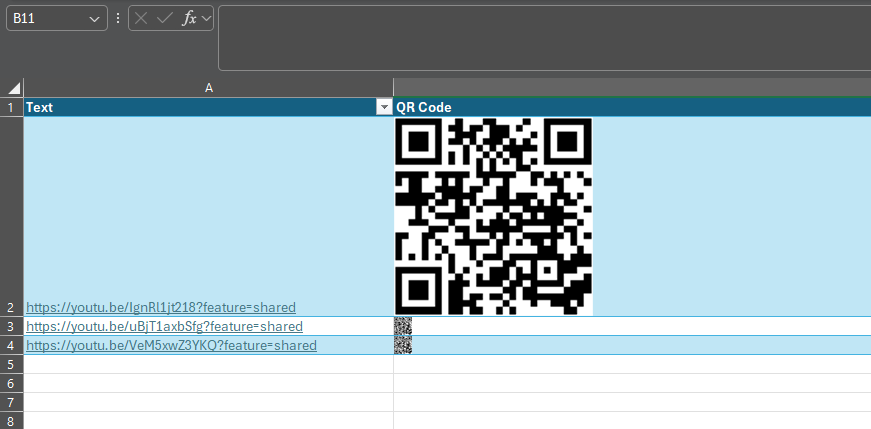
In Excel, you’ll want to create a table. Under the Insert menu, select Table and make one with two columns. Rename Column1 as Text and Column2 as QR Code.

The result should look like this:

Next, You Populate It With Your Links

In the Text column, paste the links for which you want to generate a QR code.

Then, You Add the Formula

Then, selecting the top empty space in the QR Code column, paste in the following formula: 

=IMAGE("https://api.qrserver.com/v1/create-qr-code/?size=150x150&data="&[@Text]&"")

Finally, You Have Your QR Code

This will generate a QR code for each link in the corresponding cell. While we have edited the screenshot somewhat to show you the result more clearly, all of these codes will direct to the associated link, and can be copied and used elsewhere.

It’s Really That Simple!

Stick around for more handy tips and discussions about numerous IT topics and happenings. To learn more about what we can do to assist your business with its IT directly, contact us at (604) 513-9428.

Continue reading

About Coleman Technologies

Coleman Technologies has been serving the British Columbia area since 1999, providing IT Support such as technical helpdesk support, computer support and consulting to small and medium-sized businesses. Our experience has allowed us to build and develop the infrastructure needed to keep our prices affordable and our clients up and running.

get a free quote

Understanding IT

Get the Knowledge You Need to Make IT Decisions

Technology is constantly evolving, and keeping up can feel overwhelming. Whether you want to understand cybersecurity threats, explore automation, or learn how regulations like PCI DSS impact your business, we’ve made it easy to access clear, straightforward insights on key IT topics.

Insights to Understanding IT

Contact Us

20178 96 Ave C400
Langley, British Columbia V1M 0B2

Mon to Fri 7:00am–5:00pm

[email protected]

(604) 513-9428

Coleman Technologies Awards & Memberships

Image
Image
Image