---
title: "Social Media - Blogs on IT Support and Cybersecurity for Small Business"
description: "Stay informed with Coleman Technologies' blogs, featuring insights on cybersecurity for small business, managed services, and best IT practices. Read on!"
url: "https://colemantechnologies.com/blog/tags/social-media"
date: "2026-06-07T04:02:16+00:00"
language: "en-GB"
---
# Blogs on IT Support and Cybersecurity for Small Business
Insights on cybersecurity, AI, and IT strategy to help business leaders reduce risk, improve performance, and make better technology decisions.
[ Categories ](https://colemantechnologies.com/blog/categories "Categories")
[ Tags ](https://colemantechnologies.com/blog/tags "Tags")
[ Categories: All Categories ](https://colemantechnologies.com/javascript:void(0); "Categories")
Search...Suggested keywords
[ x ](https://colemantechnologies.com/javascript:void(0);)
## [ Social Media ](https://colemantechnologies.com/blog/tags/social-media)
[ Subscribe to this list via RSS ](https://colemantechnologies.com/blog/tags/social-media?format=feed&type=rss "Subscribe to this list via RSS")
[  ](https://colemantechnologies.com/blog/blogger/darren-coleman)
## [How to Not Tank Your Cognitive ROI](https://colemantechnologies.com/newsletter-content/how-to-not-tank-your-cognitive-roi)
Thursday, 26 February 2026
[Darren Coleman](https://colemantechnologies.com/blog/blogger/darren-coleman)
[Newsletter](https://colemantechnologies.com/newsletter-content)
[  ](https://colemantechnologies.com/newsletter-content/how-to-not-tank-your-cognitive-roi "How to Not Tank Your Cognitive ROI")
Have you ever reached for your phone to check a quick notification, only to look up forty minutes later feeling drained, agitated, and behind on your schedule? For a business owner, this is more than just a bad habit, it’s a thief. While you are busy protecting your revenue and managing your team, these habits serve as an invisible tax on your focus.
Tags:
[Productivity](https://colemantechnologies.com/blog/tags/productivity-1) [Best Practices](https://colemantechnologies.com/blog/tags/best-practices) [Social Media](https://colemantechnologies.com/blog/tags/social-media)
[ Continue reading](https://colemantechnologies.com/newsletter-content/how-to-not-tank-your-cognitive-roi)
[  ](https://colemantechnologies.com/blog/blogger/darren-coleman)
## [Who's Pulling the Strings? Understanding and Fighting the Digital Algorithm](https://colemantechnologies.com/blog/who-s-pulling-the-strings-understanding-and-fighting-the-digital-algorithm)
Monday, 22 December 2025
[Darren Coleman](https://colemantechnologies.com/blog/blogger/darren-coleman)
[Coleman Technologies Blog](https://colemantechnologies.com/blog/categories/blog) [Technology](https://colemantechnologies.com/blog/categories/technology)
[  ](https://colemantechnologies.com/blog/who-s-pulling-the-strings-understanding-and-fighting-the-digital-algorithm "Who's Pulling the Strings? Understanding and Fighting the Digital Algorithm")
You've heard the grumbling, seen the memes, and probably even felt it yourself: that vague, all-powerful entity known as the algorithm. It's blamed for everything from political polarization to your inexplicable obsession with people eating military rations. What exactly is it, and what digital giants are pulling its strings?
Tags:
[Social Media](https://colemantechnologies.com/blog/tags/social-media) [Best Practices](https://colemantechnologies.com/blog/tags/best-practices) [Technology](https://colemantechnologies.com/blog/tags/technology)
[ Continue reading](https://colemantechnologies.com/blog/who-s-pulling-the-strings-understanding-and-fighting-the-digital-algorithm)
[  ](https://colemantechnologies.com/blog/blogger/darren-coleman)
## [Your Digital Life 101: The Difference Between Creating an Account and Logging In](https://colemantechnologies.com/blog/your-digital-life-101-the-difference-between-creating-an-account-and-logging-in)
Wednesday, 26 November 2025
[Coleman Technologies Admin](https://colemantechnologies.com/blog/blogger/darren-coleman)
[Coleman Technologies Blog](https://colemantechnologies.com/blog/categories/blog) [Security](https://colemantechnologies.com/blog/categories/security) [Best practices](https://colemantechnologies.com/blog/categories/best-practices)
[  ](https://colemantechnologies.com/blog/your-digital-life-101-the-difference-between-creating-an-account-and-logging-in "Your Digital Life 101: The Difference Between Creating an Account and Logging In")
We all have too many accounts nowadays. Between our personal lives, work, and practically all the entertainment we consume, there are dozens to keep track of and manage… and then there are the ones that charge us for a service they offer. The stacking costs of these services are bad enough, but if you see them start to double or even triple in a given month, you may be experiencing a common problem that is simple enough to solve.
To do so, we need to clarify the difference between creating an account and logging in.
Tags:
[Social Media](https://colemantechnologies.com/blog/tags/social-media) [Security](https://colemantechnologies.com/blog/tags/security) [2FA](https://colemantechnologies.com/blog/tags/2fa)
[ Continue reading](https://colemantechnologies.com/blog/your-digital-life-101-the-difference-between-creating-an-account-and-logging-in)
[  ](https://colemantechnologies.com/blog/blogger/darren-coleman)
## [If You See Someone Streaming Funeral Services, You’ve Spotted a Likely Scam](https://colemantechnologies.com/blog/if-you-see-someone-streaming-funeral-services-you-ve-spotted-a-likely-scam)
Friday, 04 October 2024
[Coleman Technologies Admin](https://colemantechnologies.com/blog/blogger/darren-coleman)
[Coleman Technologies Blog](https://colemantechnologies.com/blog/categories/blog) [Security](https://colemantechnologies.com/blog/categories/security)
[  ](https://colemantechnologies.com/blog/if-you-see-someone-streaming-funeral-services-you-ve-spotted-a-likely-scam "If You See Someone Streaming Funeral Services, You’ve Spotted a Likely Scam")
Funerals are never to be taken lightly, which makes it all the worse that there are people out there willing to use these events to scam those in grief. Recently, Facebook has seen many groups that supposedly offer links to streamed funerals in exchange for credit card data, with different events being added more recently.
Tags:
[Social Media](https://colemantechnologies.com/blog/tags/social-media) [Saving Money](https://colemantechnologies.com/blog/tags/saving-money) [Current Events](https://colemantechnologies.com/blog/tags/current-events)
[ Continue reading](https://colemantechnologies.com/blog/if-you-see-someone-streaming-funeral-services-you-ve-spotted-a-likely-scam)
[  ](https://colemantechnologies.com/blog/blogger/darren-coleman)
## [What’s Going on With Telegram and the State of Encrypted Communication?](https://colemantechnologies.com/blog/what-s-going-on-with-telegram-and-the-state-of-encrypted-communication)
Friday, 13 September 2024
[Coleman Technologies Admin](https://colemantechnologies.com/blog/blogger/darren-coleman)
[Coleman Technologies Blog](https://colemantechnologies.com/blog/categories/blog) [Security](https://colemantechnologies.com/blog/categories/security)
[  ](https://colemantechnologies.com/blog/what-s-going-on-with-telegram-and-the-state-of-encrypted-communication "What’s Going on With Telegram and the State of Encrypted Communication?")
Sorry for the loaded title. There’s a lot to talk about, even for those of you who don’t use or even know what Telegram is.
We’ll try to sum this up, because we think there is a lot to say about security and the nature of technology in this, and like all things these days, there’s some odd rabble-rousing about this whole series of events. Who’s up for a wild ride?
Tags:
[Social Media](https://colemantechnologies.com/blog/tags/social-media) [Current Events](https://colemantechnologies.com/blog/tags/current-events) [Communication](https://colemantechnologies.com/blog/tags/communication)
[ Continue reading](https://colemantechnologies.com/blog/what-s-going-on-with-telegram-and-the-state-of-encrypted-communication)
[  ](https://colemantechnologies.com/blog/blogger/darren-coleman)
## [Let’s Review Your Facebook Privacy Protections](https://colemantechnologies.com/blog/let-s-review-your-facebook-privacy-protections)
Wednesday, 24 July 2024
[Coleman Technologies Admin](https://colemantechnologies.com/blog/blogger/darren-coleman)
[Coleman Technologies Blog](https://colemantechnologies.com/blog/categories/blog) [Security](https://colemantechnologies.com/blog/categories/security)
[  ](https://colemantechnologies.com/blog/let-s-review-your-facebook-privacy-protections "Let’s Review Your Facebook Privacy Protections")
Last week we went through some of the issues that Facebook is dealing with in regards to its security and data privacy. Today, we thought it would be helpful to give you the tools you need to protect your privacy on Facebook.
Tags:
[Social Media](https://colemantechnologies.com/blog/tags/social-media) [Privacy](https://colemantechnologies.com/blog/tags/privacy) [Facebook](https://colemantechnologies.com/blog/tags/facebook)
[ Continue reading](https://colemantechnologies.com/blog/let-s-review-your-facebook-privacy-protections)
[  ](https://colemantechnologies.com/blog/blogger/darren-coleman)
## [Oversharing on Social Media Can Have Grave Effects](https://colemantechnologies.com/blog/oversharing-on-social-media-can-have-grave-effects)
Wednesday, 24 January 2024
[Coleman Technologies Admin](https://colemantechnologies.com/blog/blogger/darren-coleman)
[Coleman Technologies Blog](https://colemantechnologies.com/blog/categories/blog) [Security](https://colemantechnologies.com/blog/categories/security)
[  ](https://colemantechnologies.com/blog/oversharing-on-social-media-can-have-grave-effects "Oversharing on Social Media Can Have Grave Effects")
Maintaining data security is an important consideration, and most people try to do what they must to secure their personal data. They verify emails; they roll out antivirus and antimalware; they take vigilant steps to avoid the myriad of threats and active attacks we all deal with from one day to the next.
Tags:
[Social Media](https://colemantechnologies.com/blog/tags/social-media) [Security](https://colemantechnologies.com/blog/tags/security) [Technology](https://colemantechnologies.com/blog/tags/technology)
[ Continue reading](https://colemantechnologies.com/blog/oversharing-on-social-media-can-have-grave-effects)
[  ](https://colemantechnologies.com/blog/blogger/darren-coleman)
## [Social Media Scams are on the Rise](https://colemantechnologies.com/newsletter-content/social-media-scams-are-on-the-rise)
Saturday, 25 November 2023
[Coleman Technologies Admin](https://colemantechnologies.com/blog/blogger/darren-coleman)
[Newsletter](https://colemantechnologies.com/newsletter-content)
[  ](https://colemantechnologies.com/newsletter-content/social-media-scams-are-on-the-rise "Social Media Scams are on the Rise")
Social media scams are fraudulent schemes or deceptive activities that take place on various social media platforms. Users of Facebook, X (formerly Twitter), LinkedIn, and dozens of others have been victims of these attacks. These scams can target users of all ages and backgrounds, and they aim to exploit people's trust, curiosity, or lack of awareness. Social media scams come in various forms, and here are some common ones.
Tags:
[Social Media](https://colemantechnologies.com/blog/tags/social-media) [Security](https://colemantechnologies.com/blog/tags/security) [Hackers](https://colemantechnologies.com/blog/tags/hackers)
[ Continue reading](https://colemantechnologies.com/newsletter-content/social-media-scams-are-on-the-rise)
[  ](https://colemantechnologies.com/blog/blogger/darren-coleman)
## [What Search Engine is Truly the Best, Part 2](https://colemantechnologies.com/blog/what-search-engine-is-truly-the-best-part-2)
Wednesday, 30 November 2022
[Coleman Technologies Admin](https://colemantechnologies.com/blog/blogger/darren-coleman)
[Coleman Technologies Blog](https://colemantechnologies.com/blog/categories/blog) [Technology](https://colemantechnologies.com/blog/categories/technology)
[  ](https://colemantechnologies.com/blog/what-search-engine-is-truly-the-best-part-2 "What Search Engine is Truly the Best, Part 2")
Last time, we started our discussion on the best search engines by talking about the behemoth, Google. While Google is, by far, the most popular and commonly used, and arguably the most accurate search engine, it doesn’t mean it’s always the right search engine to use. Let’s talk about some other alternatives and see where they might fit in.
Tags:
[Social Media](https://colemantechnologies.com/blog/tags/social-media) [Internet](https://colemantechnologies.com/blog/tags/internet) [Google](https://colemantechnologies.com/blog/tags/google)
[ Continue reading](https://colemantechnologies.com/blog/what-search-engine-is-truly-the-best-part-2)
[  ](https://colemantechnologies.com/blog/blogger/darren-coleman)
## [What Search Engine is Truly the Best, Part 1](https://colemantechnologies.com/blog/what-search-engine-is-truly-the-best-part-1)
Monday, 28 November 2022
[Coleman Technologies Admin](https://colemantechnologies.com/blog/blogger/darren-coleman)
[Coleman Technologies Blog](https://colemantechnologies.com/blog/categories/blog) [Technology](https://colemantechnologies.com/blog/categories/technology)
[  ](https://colemantechnologies.com/blog/what-search-engine-is-truly-the-best-part-1 "What Search Engine is Truly the Best, Part 1")
Even if you lived under a rock, you’ve probably done a Google search or two. There are, in fact, other search engines, each with their own pros and cons. We’re going to compare some of the most popular search engines and talk about what makes them different.
Tags:
[Social Media](https://colemantechnologies.com/blog/tags/social-media) [Internet](https://colemantechnologies.com/blog/tags/internet) [Google](https://colemantechnologies.com/blog/tags/google)
[ Continue reading](https://colemantechnologies.com/blog/what-search-engine-is-truly-the-best-part-1)
[  ](https://colemantechnologies.com/blog/blogger/darren-coleman)
## [How SMBs Use Social Media](https://colemantechnologies.com/blog/how-smbs-use-social-media)
Monday, 23 November 2020
[Coleman Technologies Admin](https://colemantechnologies.com/blog/blogger/darren-coleman)
[Coleman Technologies Blog](https://colemantechnologies.com/blog/categories/blog) [Technology](https://colemantechnologies.com/blog/categories/technology)
## Very Small Businesses and Self-Funded Startups
For the very small business—that is the mom-and-pop shop and the sole proprietorship—social media can be the major marketing outlet for your business. In fact, many bootstrapped startups and extremely small businesses will use Facebook as their exclusive hub for marketing outreach. Since these businesses often don’t have the capital to commit to large content-driven marketing initiatives, social media gives them a way to get their brand out there at a modest cost.
Tags:
[Business Computing](https://colemantechnologies.com/blog/tags/business-computing) [Small Business](https://colemantechnologies.com/blog/tags/small-business) [Social Media](https://colemantechnologies.com/blog/tags/social-media)
[ Continue reading](https://colemantechnologies.com/blog/how-smbs-use-social-media)
[  ](https://colemantechnologies.com/blog/blogger/darren-coleman)
## [Facebook and Your Privacy (Part 1)](https://colemantechnologies.com/blog/facebook-and-your-privacy-part-1)
Wednesday, 18 December 2019
[Coleman Technologies Admin](https://colemantechnologies.com/blog/blogger/darren-coleman)
[Coleman Technologies Blog](https://colemantechnologies.com/blog/categories/blog) [Security](https://colemantechnologies.com/blog/categories/security)
## What Does Facebook Know About Me?
Consider how many opportunities Facebook has to collect information about you: there’s quite a few. For one thing, you literally tell the platform the things you “Like.” Semi-joking aside, there’s also the stuff you post, which advertisements attract your attention, and many other means for them to construct a pretty solid profile on you.
You can see this profile for yourself. In the aftermath of the Cambridge Analytica scandal - where third-party users were granted free reign and access to Facebook user info - Facebook made a promise to be more transparent. This profile is part of that transparency.
Viewing this information is pretty simple, whether you’re on your computer or you’re using the mobile application.
**On a desktop or laptop:**
1. **Log in** to your Facebook account.
2. Click the **down arrow** on the top right and go to **Settings**.
3. On the left, click **Your Facebook Information**.
4. Facebook will present you with five options. Look for **Download Your Information**.
5. Click **View**, Facebook will give you a screen where you can choose the date range and format of the data. Since we want to download everything, we’re going to set the **Date Range** to **All of my data** and set **Media Quality** to **High**. This will give us a higher quality version of all of our photos and videos in the download.
6. Click **Create File** and Facebook will start building the download. This can take a while, but Facebook will give you a notification when your data is ready for download.
7. Once Facebook gives you the notification, click it and **Download** your data.
**From the Facebook mobile app:**
1. Tap the **3-bar hamburger icon** in the top right of the app.
2. Scroll down and tap **Settings & Privacy**, and then tap **Settings**.
3. Tap **Download Your Information**.
4. Leave all of the options checked, and scroll down. Ensure the **Date Range** is set to **All of my data** and that **Media Quality** is set to **High**.
5. Tap **Create File** and Facebook will give you a notification when the data is ready for download.
The “data is ready” notification will probably come after about an hour - it really depends on how long you’ve been a user, and how active you’ve been. Most people will probably have a file that takes up a few gigabytes.
Now that the report is available to you, click on **Your Facebook Information**.
**Access Your Information** - Facebook provides you with an itemized and viewable list of your Posts, Photos, and Location history ready for viewing.
**Activity Log** - Consider this a comprehensive timeline recap - almost a scrapbook, prepared by Facebook.
**Deactivation and Deletion** - People used to complain that deleting a Facebook account was a difficult process. Not anymore!
## So, How Much *Does* Facebook Know About Me?
When you do review your file, the information they have can be shocking, mainly due to the location-based aspect of it all. You can pull up a given day and find out exactly where you were and what you did. Facebook kept track for you.
Then, you need to consider the **Ads**. This section will show you all of the advertisers who provided Facebook with a contact list your name appeared on. It isn’t that Facebook gave away this information, advertisers already had it and gave it to Facebook to target you on the platform.
## What Does This Mean?
While it completely makes sense that Facebook would know a lot about you, seeing it all laid out (and how much of it didn’t come from your profile) isn’t exactly comforting… Facebook has been too involved in a few major data breaches. Just think - there’s a profile just like the one you retrieved about you, for over a quarter of all of the people in the world.
This rabbit hole goes deeper, too. Make sure you check back soon for part two of three of this Facebook privacy blog series.
You probably had a notion that Facebook had a bunch of your information, but how much information outside of your general profile makes you nervous when they are accused of major data breaches. What’s scarier is that the service is used by over a quarter of the world’s population.
This is only the tip of the iceberg of the information we will share about this social media giant. Check back for part two of our three-part blog series about Facebook privacy.
Tags:
[Facebook](https://colemantechnologies.com/blog/tags/facebook) [Privacy](https://colemantechnologies.com/blog/tags/privacy) [Social Media](https://colemantechnologies.com/blog/tags/social-media)
[ Continue reading](https://colemantechnologies.com/blog/facebook-and-your-privacy-part-1)
[  ](https://colemantechnologies.com/blog/blogger/darren-coleman)
## [Facebook and Your Privacy (Part 2)](https://colemantechnologies.com/blog/facebook-and-your-privacy-part-2)
Friday, 20 December 2019
[Coleman Technologies Admin](https://colemantechnologies.com/blog/blogger/darren-coleman)
[Coleman Technologies Blog](https://colemantechnologies.com/blog/categories/blog) [Security](https://colemantechnologies.com/blog/categories/security)
That’s why we wanted to make sure that you knew how to reclaim your personal data and make sure it is protected. We’ll start by protecting the information that you’ve shared.
To do this, you will want to access your Facebook account on a computer. This is going to be a lot to manage, and the mobile app would only be too much trouble to navigate.
## Your Security and Privacy Options
From any page on Facebook, look for the menu, which will appear as a little downward-facing arrow. This should be at the top right-hand corner of the page. Click into **Settings**. This little arrow is your lifeline during this process, you can always find your way back to the beginning with that menu.
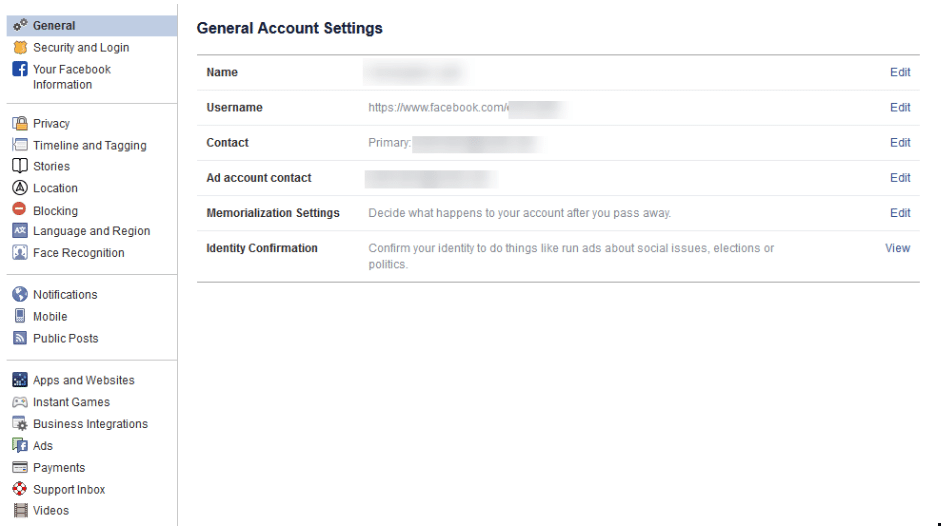
### Verify the Accuracy of Your General Account Settings
Your first order of business should be to confirm that you still have access to all of the email accounts tied to your Facebook. If an account that you no longer have access to was used, account recovery becomes monumentally more difficult.
### Find Out Where You’ve Used Facebook with Security and Login
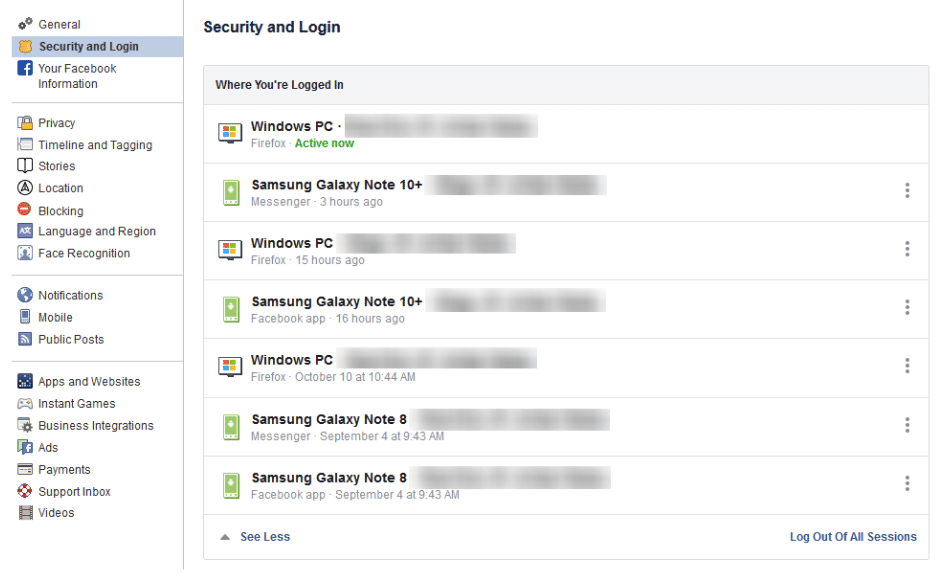
On the right, you should see the **Security and Login** option. Click it, and Facebook will show you all of the devices where your account is logged in. Fair warning, this can be shocking - especially since it includes where and when you last used that device, and what browser you were using to do so. The longer a user has been engaged with Facebook, the more devices will likely show up here.
If one of these devices is one that you don’t recognize, you will want to change your [password](https://www.colemantechnologies.com/blog/hey-you-update-your-google-password-right-now/ "password") immediately - we’ll go over how in a moment. First, you will want to log out of Facebook on any device that you aren’t actively using. This can be done through the **three-dot icon** menus next to each device listed.
### Change Your Password
While we’re on the topic, this is when you will want to make it a point to update your password. It will only take a minute and might just help keep your Facebook friends from being spammed and phished. You can do this using the process provided on the Security and Login page.
**Remember, you should never use a password for more than one online account.**
### Using Two-Factor Authentication
After your password settings, you’ll see the option to set up two-factor authentication (2FA) to help protect your account. To set it up, select **Use two-factor authentication** and click **edit**, and Facebook will provide you with the instructions you need to follow. Click **Get Started**.
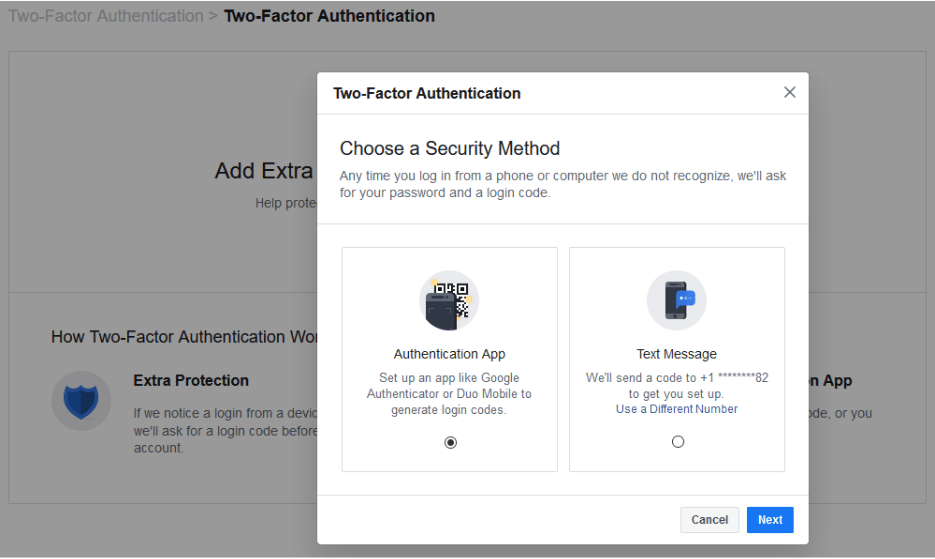
You have two options to select from as your **Security Method**, either using an authentication app, or to receive a text message with an additional code. Between the two, the application is the more secure option, although it does mean you need to have access to the mobile device whenever you want to check your Facebook.
Setting up the authentication app option is pretty simple. Open your application (which, if you have a Google account, might as well be Google Authenticator) and, on the computer, select the **Authentication App** option, as pictured, and click **Next**.
Facebook will display a QR code, which your authenticator app should allow you to scan when you add a new account to it. The app will then give you a six-digit number to provide to Facebook as a **Confirmation Code**. Simple.
If you decide to use the text message option, Facebook will simply send you a code that you have to provide upon login. It isn’t quite as secure as the app, but it will do. All you have to do to configure this is to confirm an initial code with Facebook, and you’ll be walked through the rest.
### Add a Backup
Once you have two-factor authentication enabled, it only makes sense to add an additional means of 2FA as an emergency backup - in this case, whichever method you didn’t choose. Honestly, you might as well set up both, and make use of the **Recovery Codes** option, to boot.
Under the **Add a Backup** option on the Two-Factor settings page, there is also a **Recovery Codes** option. By clicking **Setup**, Facebook will provide a brief explanation, and the opportunity to **Get Codes**. Facebook currently gives you a list of 10 single-use 2FA codes. These are one-shot codes, but you can generate a new list whenever you want from the **Two-Factor Settings page**. Make sure you keep these codes in a safe place.
### Setting Up Extra Security
Back on the **Security and Login** page, scroll down to find **Setting Up Extra Security**. This area lets you opt-in to alerts being sent via email or text, notification, or Facebook Messenger.
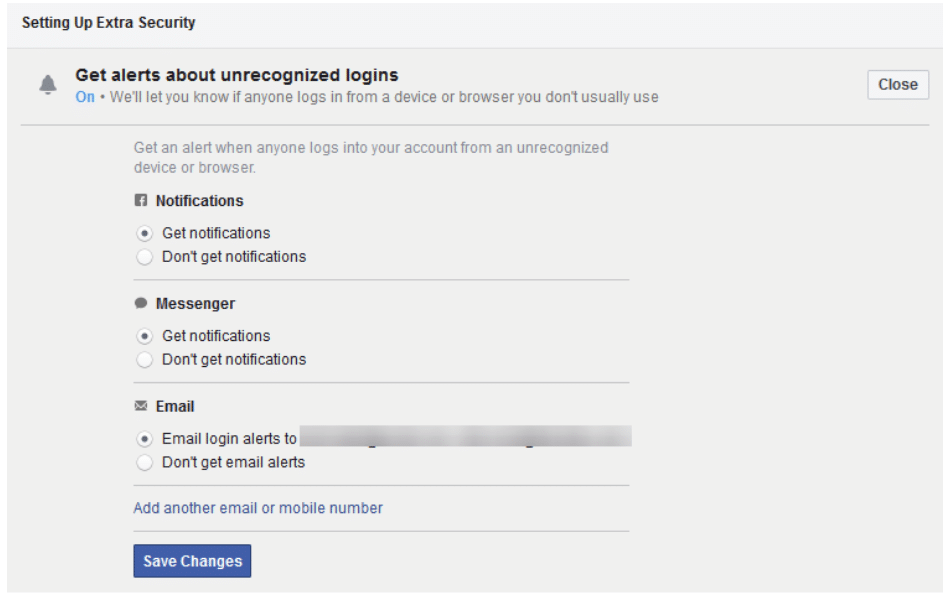
You can also **Choose 3 to 5 Friends to Contact** if you do find yourself locked out of your account. Make sure that these are people you truly trust.
Stay tuned for part three of this series, coming soon.
Tags:
[Facebook](https://colemantechnologies.com/blog/tags/facebook) [Privacy](https://colemantechnologies.com/blog/tags/privacy) [Social Media](https://colemantechnologies.com/blog/tags/social-media)
[ Continue reading](https://colemantechnologies.com/blog/facebook-and-your-privacy-part-2)
[  ](https://colemantechnologies.com/blog/blogger/darren-coleman)
## [How to Use YouTube’s Full Capabilities for Your Business](https://colemantechnologies.com/blog/how-to-use-youtube-s-full-capabilities-for-your-business)
Wednesday, 10 April 2019
[Coleman Technologies Admin](https://colemantechnologies.com/blog/blogger/darren-coleman)
[Coleman Technologies Blog](https://colemantechnologies.com/blog/categories/blog) [Best practices](https://colemantechnologies.com/blog/categories/best-practices)
Sure - if you want to limit how you can leverage it to your business’ advantage. Here, we’ve assembled a few features that you can use to make YouTube a better resource for your business.
## First Up: YouTube’s Keyboard Shortcuts
Whether you’re using YouTube as a research tool or presenting your findings in a meeting, effectively using its built-in shortcuts can make your use of the website much more productive (and, let’s face it, more impressive).
If you’re doing research, **jumping back to the beginning of a video** will be super handy - and is possible, by **pressing the 0 (zero) key**. You can also use your **arrow keys** to **fast forward or rewind** the video in five-second increments (or ten-second increments, if you **hold the Ctrl key** at the same time).
If you’re using YouTube as a part of a presentation, you can **quickly pause and resume the video** by pressing either the **spacebar**, or the **K key**. If your audience can’t quite hear what you’re presenting, **you can adjust the volume using the up and down arrow keys**. The **M key** will **mute the video, and unmute it** when you’re ready to hear the video again.
## Starting From a Specific Point in the Video
Speaking of using YouTube as a part of your presentation, you may not always want a video to start from the very beginning. YouTube gives you a few options to do so - the easiest being grabbing the altered link to your desired time directly from YouTube.
Let’s look at this video about [phishing](https://www.colemantechnologies.com/blog/how-not-to-teach-your-team-about-phishing-courtesy-of-godaddy/ "phishing"):
There’s a lot of information in this video. What if you want to focus on one specific aspect, like how phishing can be spotted? This video doesn’t dive into this aspect until just about the one-minute mark. YouTube offers a function that eliminates the need of fast-forwarding to this point. Under the **Share** option, the menu that appears offers a **Start at** option. You can select the precise time that you want your video to start. The link that appears will begin your video at the moment you have selected (unless a pesky ad gets in the way):
## Search Filters to Improve Your Results
If you’re having trouble finding the right content on YouTube, there are filters that you can whittle down your results by - making it more likely that you will find more videos that fit what you are looking for. You can seek out videos that were uploaded during a specific time frame, that fall within a certain duration, and seek out specific channels, playlists, and other media types - among other filters.
YouTube can be one of the greatest resources available today... as long as you can find and share the information you need. For more ways that technology can improve your business and its processes, subscribe to our blog!
Tags:
[Social Media](https://colemantechnologies.com/blog/tags/social-media) [Tip of the Week](https://colemantechnologies.com/blog/tags/tip-of-the-week) [User Tips](https://colemantechnologies.com/blog/tags/user-tips)
[ Continue reading](https://colemantechnologies.com/blog/how-to-use-youtube-s-full-capabilities-for-your-business)
[ First Page ](https://colemantechnologies.com/javascript:void(0);) [ Previous Page ](https://colemantechnologies.com/javascript:void(0);) [ 1 ](https://colemantechnologies.com/javascript:void(0);) [ Next Page ](https://colemantechnologies.com/javascript:void(0);) [ Last Page ](https://colemantechnologies.com/javascript:void(0);)
## Schema
```json
{
"@context": "https://schema.org",
"@type": "BreadcrumbList",
"itemListElement": [
{
"@type": "ListItem",
"position": 1,
"name": "Home",
"item": "https://colemantechnologies.com"
},
{
"@type": "ListItem",
"position": 2,
"name": "Blog",
"item": "https://colemantechnologies.com/blog"
},
{
"@type": "ListItem",
"position": 3,
"name": "Tags",
"item": "https://colemantechnologies.com/blog/tags"
},
{
"@type": "ListItem",
"position": 4,
"name": "Social Media",
"item": "https://colemantechnologies.com/blog/tags/social-media"
}
]
}
```